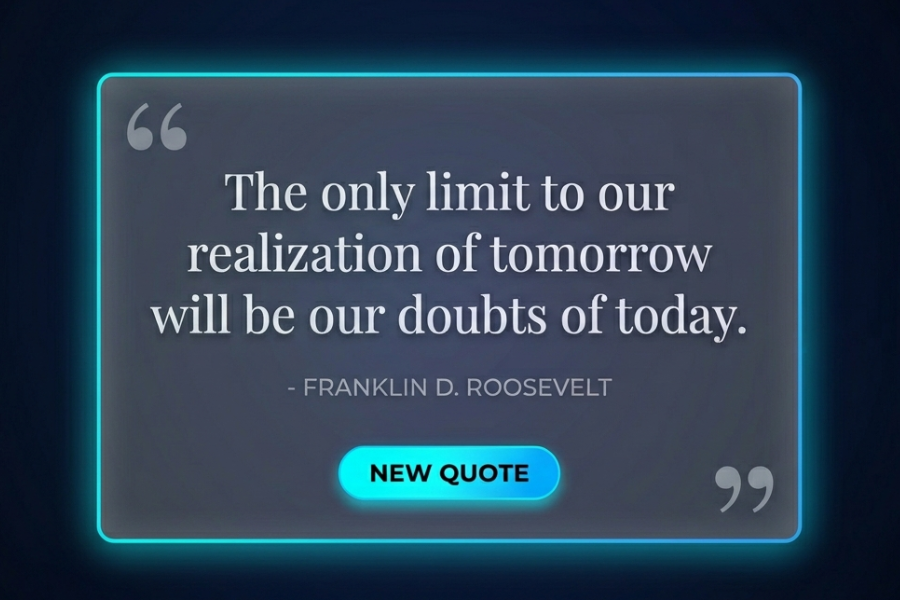
Welcome to TechTimesGlobal.The project is a well-developed web application, Quote Generator created with HTML, CSS and JavaScript. The major use of such application will be to show inspirational quotes at random when the user presses a button. It is basic in operation, but very aesthetic in design and is a wonderful example of mixing creativity and programming.
In the fast digital world, nowadays, individuals seek to be motivated or inspired in a short amount of time. This quote generator offers that experience in an exciting manner. It does not display plain text, but gives quotes with smooth animation, glow effects and a modern interface. It features dark colors, gradient effects, and motion effects, making the app look like a high-quality and interactive experience.
This is a good project to start on when one wants to learn frontend development since we learn the relevant topics like layout design, animations, event handling, and dynamic updates of content.
HTML Structure
The layout and the content of the webpage should be determined by the HTML structure. It starts with the standard HTML declaration making it compatible with all the modern browsers. The language attribute of the <html>The tag has the language attribute that is English that enhances accessibility and SEO.
Within the section, ones will find necessary settings like character encoding and viewport setting. These are used to make sure that the webpage shows up appropriately on various machines, such as mobile phones. Here, the title is defined, and it is shown on the browser tab. Google Fonts are also associated with provide the text with a cool and classy appearance.
The visible part of the application has been placed in the <html>The <html>The visible portion of the application has been placed in the <html> It involves decorative features such as blur circles, contributing to the background design. CSS is used to place these circles which give them a glow effect.
The quote box is the container in the middle of which the main content will be put. This is a card that holds the quote and controls. This box has ornamental quote Marks on the top and bottom. Such marks will provide an edge of creativity and enhance the overall design.
A primary quote text is presented in a paragraph element. The name of the author appears below it via a span element. These two aspects are dynamically changed with a new quote being generated with the use of JavaScript.
The card has a button on the bottom that is called New Quote. This button enables them to create a new random quote. The button is put in a container to ensure that it is aligned properly.
The HTML structure is generally clean and well-structured and therefore easy to comprehend and maintain.
CSS Style
CSS portion ensures that the application is well-designed and up-to-date. It has a black style with bright colors of accents such as cyan and blue. This mixture makes it a high contrast and catchy design.
The main content of the page is designed to occupy the whole screen and align the content. Keyframes are used to create a gradient background animation. The background has a dynamic quality because this animation slowly turns and shifts.
Effects of depth and glow (blur circles) are considered. These circles are slowly moving with the help of animation, giving the background a look of movement. The blur and use of opacity provide a soft glowing effect.
The quote box is designed using a glassmorphism effect. This is done with a semi use of a blur filter and a semi-transparent background. The box is also surrounded by a glow box through the use of graduate and blur effect. The user can hover on the box and this causes it to slightly rise and the glow to intensify. This makes this design interactive.
A serif font has been used in the text of the quote to impart the text a classic and elegant appearance. The text will have a gradient effect on it, which makes it attractive to the eyes. The writing is written in less heavy color and spacing to distinguish it with the quote.
The button is round in shape and has a gradient background. It consists of hover, click effects including scaling and shadow effects. All these effects render the button responsive and interactive.
There are also text transitions made with the use of animation. A new quote is generated and the text does fade away before coming back in, however. This enhances the user experience and renders the change of content to be natural.
It is also responsive in nature i.e. it adapts to small screens by shrinking fonts and distance between fonts. This will make sure that the application is compatible on mobile devices.
JavaScript Functionality
The quote generator is dynamically added with JavaScript. It chooses and shows randomly selected quotes.
It begins the script with the creation of an array of quote objects. A quote and its author are found in each object. This allows it to easily organize and add to the list of quotes.
Then the script picks significant optional HTML features like text of the quote, text of the author and button. These are the features that are used to revise the content dynamically.
The primary function, displayNewQuote is given the task of producing a new quote. When this action is invoked, it initially appends a fades out effect to a text already being visualized. This gives effect to a transition effect.
After a brief pause, array selection is made of a random quote. The author name and text content of the quote is updated with new values. At this point, the fade-out effect is eliminated, and the text will fade into view.
To the button, an event listener is attached, and the user clicks them, and the function is called. This will enable users to come up with new quotes at any given time.
Also, the function is invoked, when the page loads. This makes sure that the quote is generated without delay and it is not the default text, but rather a random quote.
This algorithmic selection and animation makes the user experience a stimulating and interactive one.
Overview
This quote generator is a full front-end application illustrating the potential of HTML, CSS, and JavaScript operating collectively to develop a contemporary web application. The HTML offers the structure, CSS offers the design and JavaScript offers functionality.
The project is not complex and is efficient. It demonstrates how to respond to the user, work with data with the help of arrays, and dynamically update the material. It is visually impressive with the usage of the animation and modern UI techniques.
The project can also be handy to beginners as it touches upon such fundamental concepts as manipulation of Dom, event processing, and responsive design. It can also be expanded to include functionality such as quote-sharing, bookmarking or fetching quotes via an API.
Source Codes[Scroll Down]
From here, you can download the source code files for this Bakery Website Hero Section by clicking the download button provided below.
The source code is completely free and can be reused or modified for your own projects.
Click here –Premium BMI Calculator Using HTML, CSS, and JavaScript with Modern UI