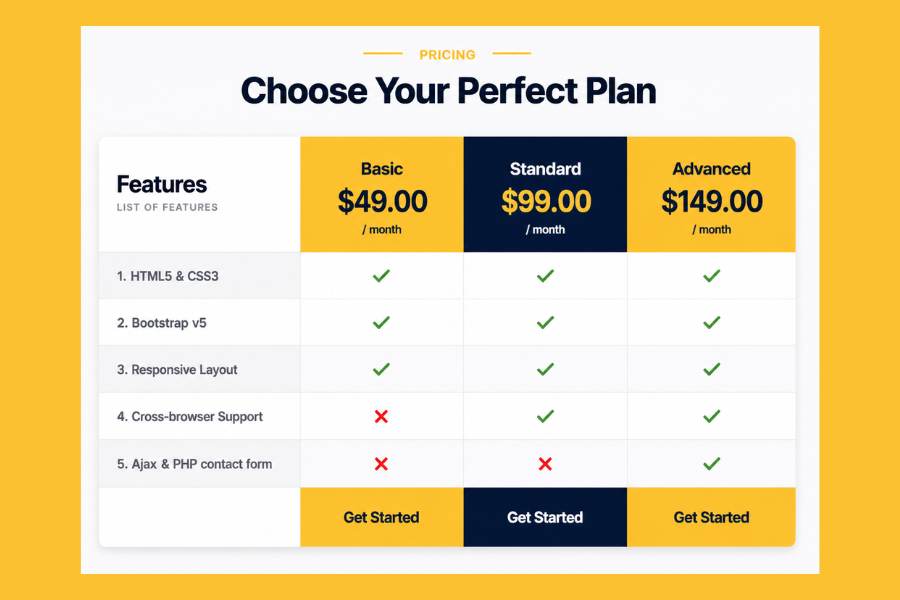
Welcome to TechTimesGlobal. TIn this project we will design a clean and modern Pricing table UI Design using HTML, Tailwind CSS and JavaScript. This design is highly helpful when you have to work with a SaaS site, business home page, or even subscription-based site. The layout in the image above displays three pricing plans, namely, Basic, Standard and Advanced with feature comparisons in well-structured table format.
Some of the most crucial sections of product or service websites are pricing tables. They assist in making users well aware of what they are getting their money. An effective pricing section can have a direct effect on the user decision and enhance conversion. This is why the design should be easy, attractive and easy to compare.
The pricing plans in this design are in bold headings, highlighted pricing and availability in checkmarks and cross icons. The color scheme of yellow and dark blue contrasting helps to make the plans stand out. The UI is conversion-friendly and the Get Started buttons prompt users to perform actions.
HTML Structure
This pricing table has a clean HTML structure and is easy to comprehend. Begin by developing a principal container that contains the whole pricing section. Within that, include a title such as Select Your Ideal Plan to bring in the section. Second, use divs to make a table-like layout. The list of features (HTML5 and CSS3, Bootstrap v5, Responsive Layout, Cross-browser Support and Contact Form) will be put in the first column. Next, make three columns of the Basic, Standard and Advanced plans.
TailwindCSS Style
The styling of this pricing table is the Tailwind CSS which makes it appear contemporary and professional. Tailwind enables you to easily apply styles with utility classes without creating large CSS code.
Begin with background color softer in the whole part. Next add some padding, rounded corners and shadows on each pricing column to resemble a card. The yellow background can be used in the Basic and Advance plans, although the Standard plan can have a dark blue emphasis to make it look like the preferred choice.
Use large fonts on names of plans and big fonts on prices. The lines of features should be separated by light backgrounds to read better. Checkmarks (✔️) and crosses (❌) can be designed to be colored in green and red respectively.
Strong colors with hover effects such as brightness change or scale animation should be used on buttons such as Get Started. With Tailwind, it is simply a matter of adding responsiveness with classes such as md:grid-cols-3 to make the layout flawless on mobile devices.
Overview
The project is very practical since in nearly all business sites today pricing tables are applied. Whether powered by a SaaS platform, a hosting service or an online tool, pricing sections are crucial. Through this design, you will study layout structuring, UI hierarchy, feature comparison design and responsive styling with Tailwind CSS. These are good frontend developer skills. This project is ideal to learn modern UI design in case you are a beginner. You will know how to organize complicated layouts, place the content correctly, and apply Tailwind CSS effectively. It also educates on the ability to create user-friendly sections that are informative and appealing to the eye. These are critical in the web development in the real world.
Source Codes[Scroll Down]
From here, you can download the source code files for this Responsive Pricing Table UI Design by clicking the download button provided below.
The source code is completely free and can be reused or modified for your own projects.
Click here -Modern Feature Card Design Using HTML and CSS for Clean UI and Responsive Layout