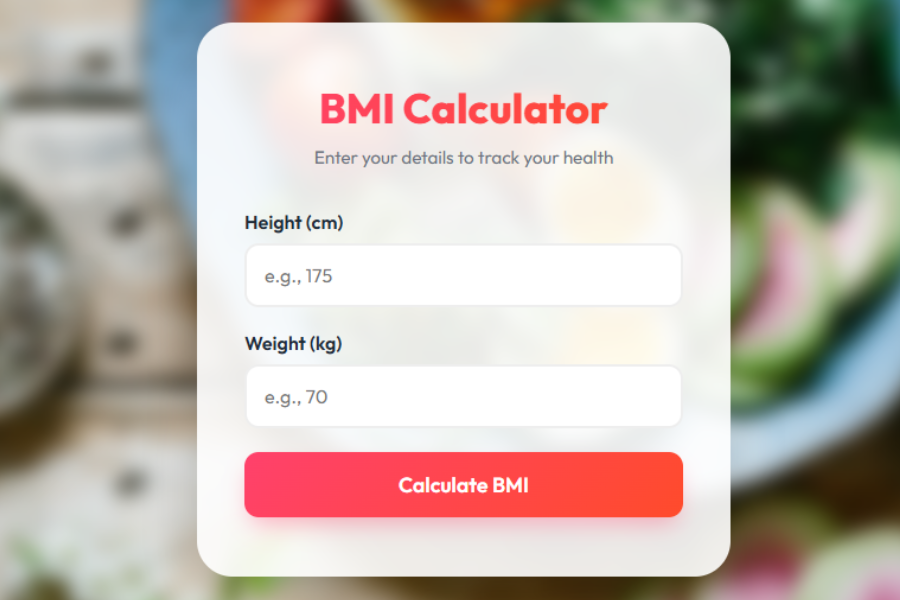
Welcome to TechTimesGlobal.The project is a Premium BMI (Body Mass Index) Calculator created with JavaScript, CSS and HTML. It is created to assist users to easily determine their BMI, through typing their height and weight. BMI is a significant health indicator, which makes individuals realize whether they are underweight, normal or overweight. This application will not only calculate the result but also display it in a friendly and user-friendly manner.
The modern and clean design with the blurred background effect and the centered card layout is an element of the design of this calculator. It provides an upscale experience like actual health and fitness apps. This project aims at blending between practicality and beauty to ensure ease of use and beauty. It is particularly beneficial to beginners since they are interested in learning how to create interactive web applications.
HTML Structure
The calculator of the BMI is based on HTML as its logical structure. It begins with a typical HTML5 declaration, which means that the webpage is compatible with all the latest browsers. The tag <html>The tag has an attribute of language that enhances accessibility and improves the understanding of the content by search engines.
Within the section, crucial aspects like character encoding and viewport settings are stated. These will make sure that the page is displayed properly on other devices, such as mobile phones. There is also a title added, which is displayed in the browser tab. Additionally, a Google Font called “Outfit” is included to give the text a modern and stylish look.
The rest of the page is in the hidden content of the body. All the components of the BMI calculator are contained in a main card. The card will be placed in the middle of the screen and serve to interact with the user.
The card has a heading in the top part of which it is clearly indicated that it is an BMI Calculator. Under it, there is a subtitle which contains a brief instruction which tells users to fill their details. This simplifies using the interface, even among individuals with little or first-time users.
The kind has two fields of input. The first one is height input in centimeters and the second input is weight input in kilograms. These two values are crucial since these are the two values used to determine BMI. The input fields have labels indicating to the user the information they need.
Below the inputs, there is a button labeled “Calculate BMI.” When the user clicks this button, it will activate the JavaScript function to calculate.
At the bottom of the card is the result portion. This section is at first concealed. Upon calculating, it will get a visual and show the BMI and health status and a short message. This dynamic behavior enhances the user experience.
CSS Style
CSS component will ensure the BMI calculator is appealing in terms of look and feel. It applies both pairs of gradients, shadows and blur effects to craft a high-end design.
The page is provided with a background image with a blur effect. It is done with the help of the ::before pseudo- element. The blur effect makes the background image move soft and makes sure that the underlying content can be read. Slight scaling is also done to exclude the undesired edges.
The primary card is designed with semi-transparent white background, rounded corners, and soft shadow. This gives a nice and classy appearance. Flexbox allows the center of the card to stay at the center of the screen of all devices.
Typography is significant in the design. There is the use of a gradient color effect in the heading making it prominent. The subtitle is in light color and this visual hierarchy is obvious. This aids users to comprehend the composition of the contents easily.
The input boxes are designed as padded, rounded and smooth-bordered. When a user makes a click on an input field a focus effect is implemented. This has a color change of the border and some gentle glow meaning that the field is active.
The button has a gradient and vivid colors. It has hover effects like slight movement and increase in brightness. These are the effects that bring forth the interaction and responsiveness to the button.
The section of results is made to look clean and orderly. It incorporates a big font of the BMI value that is easy to read. Your health status is indicated using different colors. E.g., normal, overweight, and underweight is green, red, orange. This color coding makes the user quickly get an idea of their result.
JavaScript Functionality
The BMI calculator has functionality and interactivity, which are added with JavaScript. The primary work unit, which will be invoked to compute BMI is calculateBMI.
The first one is that the function retrieves the values which are at the height and weight input boxes. It verifies the values to be valid. In case the user has not typed in any values or in case the user types the wrong data, then the user receives a message. This provides that the calculation is only done with valid inputs.
When the valid values are given, the BMI can be calculated according to the formula:
BMI = weight (kg) / height² (m²)
The calculation is done by first changing the height in centimeters to meters. The answer is then rounded off to one decimal point so as to be well readable.
Once the calculation of BMI is fulfilled, the results are described. The BMI value is shown in a large font. The script then deduces the health status of the person using the value of BMI. With less than 18.5 BMI, then the user is classified as underweight. A between 18.5 and 24.9 and the user is normal. When its value exceeds 25, then the user can be classified as overweight.
A short message is also displayed for guidance of the user along with the status. The basic ideas are given in these messages, like keeping overweight or attempting to slim down. The color of the status text changes based on the category, making the result more visually clear.
This interactive and user friendly behavior enables the application. It offers immediate response without reloading the page.
Overview
This is a total web application utilizing a combination of structure, design and functionality in this BMI calculator. The layout is written in the HTML, the appearance design in the CSS, and the interactive option in the JavaScript.
The initiative is straightforward and mighty. It illustrates key web development principles like user input processing, computation, conditional code, and dynamic user interface refreshes. The application has been visually attractive by use of the modern design features such as gradient text, blur background, and smooth animations.
This is an excellent project that newcomers can use as it deals with the frontend design as well as with the fundamental logic of programming. It may be also further expanded with such features as BMI history tracking, charts or personal health tips.
Source Codes[Scroll Down]
From here, you can download the source code files for this Bakery Website Hero Section by clicking the download button provided below.
The source code is completely free and can be reused or modified for your own projects.
Click here –Advanced Age Calculator Using HTML, CSS, and JavaScript with Glassmorphism UI