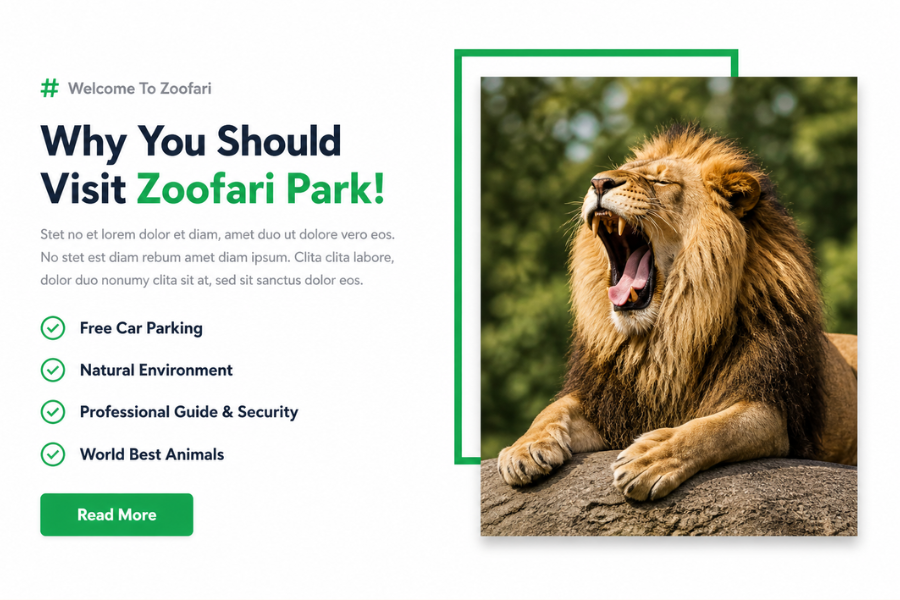
Welcome to TechTimesGlobal. This is a project where we are going to develop a beautiful Zoo Landing Page UI Design using HTML, Tailwind CSS. In the event you are seeking to develop a nature site, wildlife project, animal park landing page, tourism site or a creative promotional page, then this project will be a great learning experience. The design incorporated in the image above includes a clean design, bold typography, appealing call-to-action buttons, checklist functionality, and high-quality wildlife photography to provide an attractive user interface.
Landing pages are created so as to draw attention easily and direct the visitors towards a particular action. In this instance, the zoo home page presents the visitor with a location named Zoofari Park with a strong message and a very beautiful picture of a lion. The powerful typography, the use of green accent color, and the neat spacing can build a professional and trustworthy layout.
The content is concentrated on the left side of the design. It presents the park, reasons why a user should visit the park, and some of the key benefits, including free parking, natural environment, professional guidance, and world-class animals. The image on the right side features a large image of animals, which is both emotionally engaging and visually appealing. This equilibrium between text and visuals makes the design appear upscale and current.
HTML Structure
The HTML code of this landing page is clean, simple and beginner friendly. Begin by defining a main section container that contains all the contents. Within that part, subdivide the layout into two columns with flexbox or grid.
TailwindCSS Style
This landing page has a contemporary and sophisticated look brought about by the Tailwind CSS styling. Tailwind simplifies the process of developing responsive designs in a short period of time with the help of utility classes.
A plain background of soft white or light gray is a good starting point to a clean look. Then use bold typography to the main heading to ensure that the main heading is the focus point. To match the theme of nature, highlight important text such as Zoofari Park using accent colors of green. Proper spacing, line height and balanced typography should be used in the content area to ensure that it is readable. The green backgrounds in a circle shape can be used in checklist icons to produce consistency. In the case of the lion image featured, shadows, rounded corners, and layer effects on the border are added. This brings about depth and makes the image visually strong.
Overview
The project is very beneficial as landing pages are utilized in nearly all the industries. Although you are either developing websites on tourism, wildlife organizations, travel businesses or educational sites, the landing page design is very crucial. As you develop this project, you get to know the layout structuring, visual hierarchy, content placement, responsive design, and the storytelling of the UI. These are the most vital front end developer skills. This project is a good practice project in case you are just beginning frontend development. It will make you familiar with the layouts of two columns, image placement, sections of call to action, responsive design and styling using Tailwind CSS. They are useful in developing professional landing pages and client projects.
Source Codes[Scroll Down]
From here, you can download the source code files for this Zoo About Section Design by clicking the download button provided below.
The source code is completely free and can be reused or modified for your own projects.
Click here -Nova Specialist Hospital Website Using HTML, CSS & JavaScript