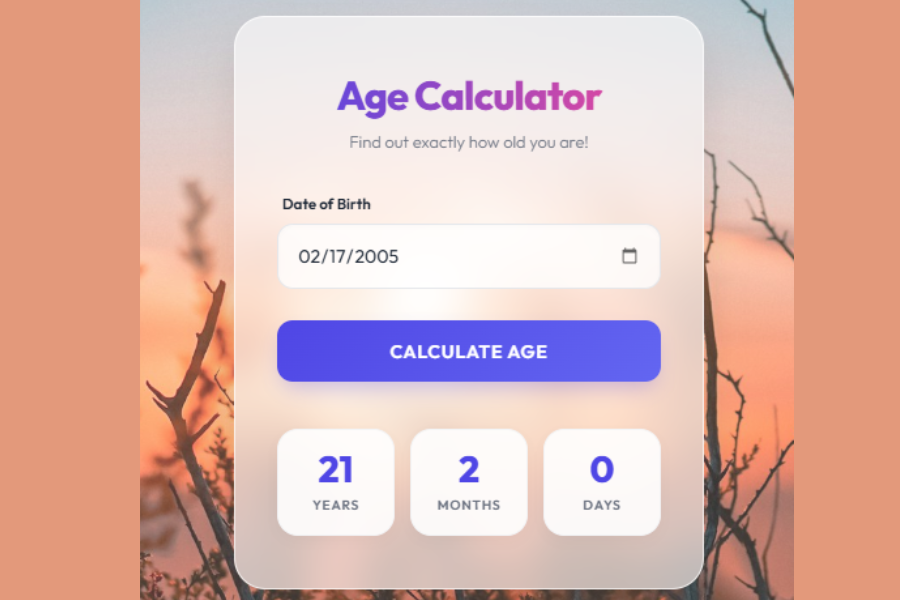
Welcome to TechTimesGlobal.The model is a well-organized Age Calculator written in HTML, CSS and JavaScript. It enables users to figure out their exact age in terms of years, months and days by just entering their date of birth. The design is contemporary and appealing to the eye and based on a concept known as glassmorphism that provides a frosted glass appearance. This causes the application to appear high-quality and like the real-life web applications.
The fundamental aim of this project is to make a blend of functionality and design. It is not only the calculation of age but also the offering of an easy and interactive user experience. The interface features a background image, sleek input fields, animated results and interaction. This renders the project apt to both novices who would learn about web development, and those developers keen on developing contemporary user interface designs.
HTML Structure
The HTML section takes care of the structure of the webpage. It starts with the default-HTML5 declaration which makes the webpage functional in any modern browsers. The language attribute of the tag is set to English, enhancing accessibility and making a search engine comprehend the content.
Within the section, such vital settings as character encoding and viewport configuration are provided. These make sure that the webpage can be viewed on all the devices even mobile phones. It has also a title given, which is displayed in a browser tab. There is also a Google Font called “Outfit” that is treated to give the text a clean and fresh look.
The visible content of the webpage is contained in the section of the webpage referred to as the body. The calculator is centered on the screen using a main container. Within this container is an element of card that contains all the content. This card is a primary component of the UI and has the heading, input field, button, and results section.
On the heading of the card, there is a title which is Age Calculator and followed by a subtitle. The subtitle provides a clear understanding of the application. Under this, there is an input field whereby the users are allowed to choose the date of birth. The type of date input is used with the date type that involves a calendar picker enabling easy selection.
Then there is a button that will say to Calculate Age. Upon the clicking of this button, the JavaScript function is executed in order to obtain the age. Under the button, one has a results section. There are three boxes in this section which show the number of calculated years, months and days. Initially, this section is hidden and only becomes visible after the calculation is performed.
CSS Style
It is the CSS that makes this project visually appealing and up-to-date. It incorporates a light palette of color with hues of indigo, pink and white. These colors are defined by CSS variables and can be easily controlled, and the design can be updated.
The body of the page is designed with a full screen background image. This picture creates a tranquil and natural impression on the application. A light overlay is placed over the background to be able to read the content. This overlay makes the image a little bit darker and enhances the contrast.
The primary card is based on glassmorphism (this effect is created with the help of a semi-transparent background and a blur filter). This gives it a frosted glass appearance and the design appears modern and stylish. Its corners are also rounded, and there is a slight shadow on the card, which is also a detail that gives the card an appearance of being depth-laden and out of the background.
Type typography is well developed with the help of Outfit font. The colored heading has a gradient color, as it mixes two colors together. This will be more appealing to the title. A visual hierarchy is established through the use of a lighter color in the subtitle.
The field of the input is padded, rounded and soft-backed. Once the user clicks on it a focus effect is provided which highlights the border. This assists users realize that there is work in the field. The calendar icon has been made stylish and interactive as well.
The button has a gradient gradient and powerful colors. It has hover effects, click effects, including slight movement and change of brightness. Such animations ensure that the button is more interactive and responsive.
The results tabular form is gridded. The background of the results boxes is clean white with rounded corners and slightly shading shadow. The boxes become slightly magnified when hovered, forming a fluid animation. The results are concealed and when activated, they unveil themselves with repeated fade and slide effects.
It is also responsive in terms of its design, which in turn adapts to various sizes of the screens. Font sizes and spacing is minimized on small screens as they are minimized to make them usable.
JavaScript Functionality
JavaScript adds the main functionality to the age calculator. In the absence of JavaScript, the page will just be a page of fixed content. The script starts by setting the maximum selectable date in the input field to today’s date. This does not allow the user to choose any date in the future that would not be sensible in calculating age.
The main function, calculateAge(), is triggered when the user clicks the button. First, it verifies the whether a user has chosen a date or not. Otherwise, it presents a warning message to the user to provide his date of birth. This is just an operation to validate the correct input.
After having been presented with a valid date, the script computes the difference between the current date and the birth date. It determines the number of years, months and days individually. But months and days may be different so corrections are taken in order to achieve the accurate results.
In cases when the period of the year is prior to the month of birth, then the year value is subtracted by one year, and months need to be altered. On the same note, when the current day is before the birth day, the value is computed by calculating the days in the month gone before and the script amends the values. This guarantees the resultant process is accurate.
Upon calculations, the script replaces the information of the result elements on the page. It shows the number of years, months and days computed. It then appends an element to the results array and that is made visible in a smooth animation. This provides an interactive and participatory user-experience.
Overview
This age calculator is an ideal case of how HTML, CSS, and JavaScript can be integrated to make up a complete web application. The HTML contains the structure, the CSS the visual design and JavaScript functionality and interactivity.
The project itself is an easy but effective one. It reflects some key ideas like working with forms, date operations, responsiveness, animation, and the latest style of UIs. The use of glassmorphism and gradient effects makes it visually appealing, while the accurate age calculation ensures functionality.
This kind of project is highly beneficial to novices since it encompasses design and logic. It may also be extended to include such features as data saving, showing age in hours or minutes or connecting to some backend system.
Source Codes[Scroll Down]
From here, you can download the source code files for this Bakery Website Hero Section by clicking the download button provided below.
The source code is completely free and can be reused or modified for your own projects.
Click here –Modern Feedback Form Using HTML, CSS, and JavaScript with Star Rating and Validation