Welcome to TechTimesGlobal.The structure of the application and all the UI elements are provided by HTML. It is broken into sections to provide a seamless user experience.
The application starts with a light/dark toggle switch button. All screens used across the app are stored in the main container. Home Screen, Quiz Screen and Result Screen are the screens included.
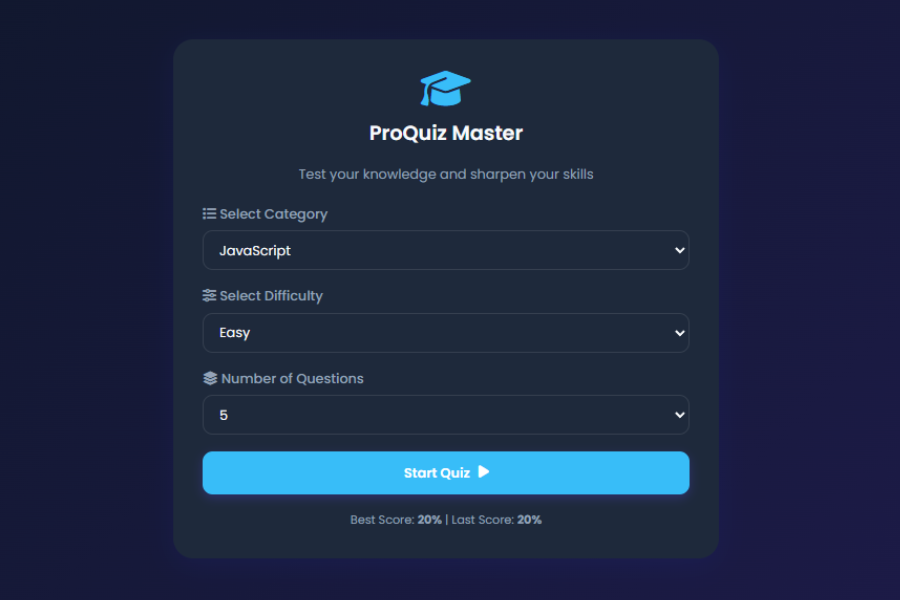
On the Home Screen, there are form controls that let users choose the categories of the quizzes, including HTML, CSS, JavaScript, and General Knowledge. It also offers difficulty level and number of questions drop-down boxes. The Quiz is started by a Start Quiz button.
The Quiz Screen will show the current question, the answers, the progress bar, the category information, the timer and the navigation buttons. This section dynamically loads each question in the game based on user selections.
Once a quiz is completed, the Result Screen is displayed showing a score percentage, a grade, correct answers, incorrect answers, unanswered questions, and how long it took to take the quiz. A review section allows users to analyze their responses and compare them with correct answers.
HTML Structure
HTML is the structure language of the application and is used to structure all of the application’s user interface elements. It’s segmented into several sections to ensure a seamless user experience.
The application starts with a toggle button of the theme which enables the user to switch between light and dark themes. All the application screens are stored inside the main quiz container. The Home screen, Quiz screen and Result screen are all of these screens.
There are form controls on the Home Screen for users to choose categories of quizzes (HTML, CSS, JavaScript, and General Knowledge). It also features drop down menus to choose the level of difficulty and number of questions. The Start Quiz button is used to start the Quiz session.
The Quiz Screen shows the currently active question, the answers, the progress bar, the category information, the timer and the navigation buttons. This is where all of the questions are loaded dynamically based on user selections.
Result Screen will appear once the Quiz is completed and the performance statistics includes the percentage score, the grade, number of correct answers, number of errors, number of unanswered questions, and time taken. Users can review answers and compare them to correct answers in a review section.
In general, the structure of the HTML is organized, semantic and intended to efficiently support dynamic interactions.
CSS Style
The CSS will take the basic HTML structure and make it look good and up to date in order to create a quizzing application. The design matches the latest UI/UX trends and looks more professional.
The application is designed to adhere to consistency in colors, typography and spacing using CSS variables. Gradient backgrounds offer a visually engaging effect, and glassmorphism effects add a contemporary and chic touch. The translucent cards, haze and soft shadows play into a high-end design style.
The Quiz container is positioned in the centre of the screen, and it has rounded corners, smooth transition animation and shadows for a professional look. Light mode, and dark mode have different color schemes for each so users can personalize their viewing.
Hover and smooth transitions enhance user interaction with buttons. Progress bars and circular timers are styled to give live visual feedback on the quiz. The answers are highlighted as correct (in green) or incorrect (in red) to provide the user with a quick feedback regarding his or her performance.
Media queries keep the application 100% responsive on desktop, tablet and smartphone. This responsive design makes it easier to access and better user experience.
JavaScript Functionality
All the interactive elements of the Modern Premium Quiz App are powered by JavaScript. It handles all the quiz operations, user interactions, timer, scoring, and data storage.
It has a vast question bank that is categorized in different sections and has varying levels of difficulty. On loading, users initiate a Quiz, which is filtered by Category and Difficulty, using JavaScript.When users start a Quiz, JavaScript filters the questions by category and level of difficulty. The questions are then scrambled to provide a different experience, each time.
Each question has a countdown timer to ensure that the user answers within a time limit. When the Timer expires, the question is automatically considered unanswered and the correct answer is shown before they move on to the next question.
The answer buttons are dynamically created in JavaScript and user selection is processed in JavaScript. On selection of an option, the system would immediately check the correctness of the answer. Visual cues used to give immediate feedback.
Another feature of the application includes a progress bar for tracking quiz progress and updating the question count in real-time. The navigation buttons enable the user to navigate between the questions or bypass the questions as needed.
JavaScript computes the final percentage, grades, and personalizes performance messages at the end of the quiz. The result screen shows statistics like the number of correct answers, incorrect answers, unanswered questions and total time spent.
Also noteworthy is their Local Storage integration. JavaScript saves the users’ favorite score, new score, and preferred theme settings straight to the browser. This enables data to remain even after restarting or reopening the application.
JavaScript is also used with the answer review system. It makes a comprehensive report indicating each question, answer chosen by the user and the correct answer. This functionality is important to make users learn from their errors and enhance their learning.
In summary, JavaScript enhances the app’s functionality, making it a comprehensive and interactive platform for creating and delivering quizzes that are both informative and entertaining.
Overview
Modern Premium Quiz App is an HTML, CSS and JavaScript based educational web application with a number of features. It offers users a fun platform to assess their knowledge via category-based quizzes, timed challenges, structured analysis and comprehensive reviews of answers. Featuring a responsive design, modern UI, dark mode and intelligent quiz capabilities, it is an effective learning and assessment platform. The project helps to clearly illustrate the application of front end web technologies in creating interactive and user friendly web applications.
Source Codes[Scroll Down]
From here, you can download the source code files for this Personal Diary Website Design by clicking the download button provided below.
The source code is completely free and can be reused or modified for your own projects.