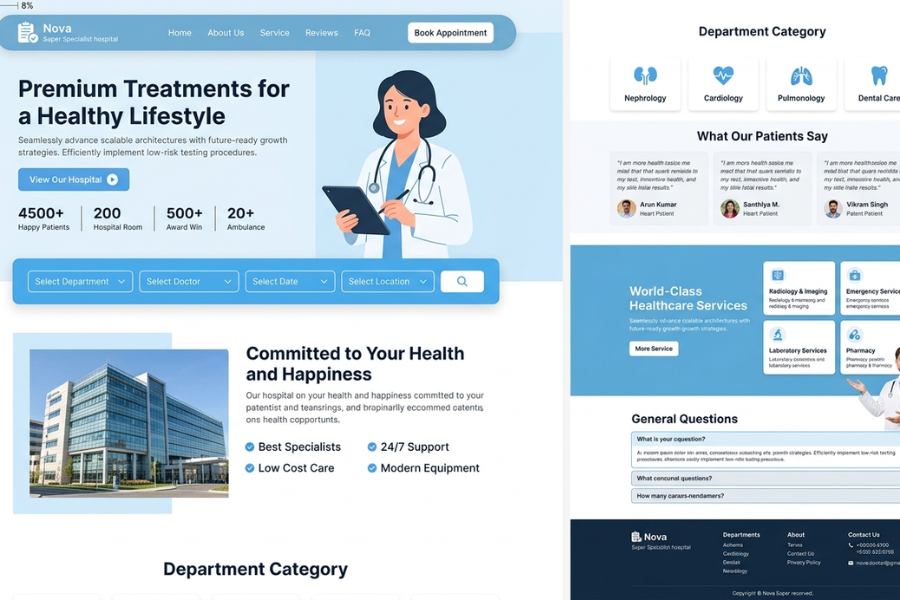
Welcome to Techtimesglobal. This project will involve designing a modern Hospital Web UI with HTML, CSS and JavaScript. In case you need to create a clean and professional web design, in particular, when working on healthcare-related projects, the given design will be quite useful to you. The UI presented in the picture above is easy to use, appealing, and simple, and that is just what a hospital site requires.
A hospital internet site cannot be compared to a normal site. It ought to be made in a manner that instills trust and enables users to access important information fast. When an individual goes to a healthcare site, he/she is most likely seeking services, physicians or where to make an appointment. The design has to be clear, easy to navigate and easy on the eye, therefore.
In this design, the home page begins with a simple navigation bar that contains such sections as Home, About Us, Services, Reviews, and FAQ. It has also a Book Appointment button, which is very important as it allows users to take action. This kind of CTA (Call To Action) enhances the user experience and increases the functionality of the site.
One of the key features of this UI is the hero section. It contains a bold text such as “Premium Treatments to a Healthy Lifestyle with a doctor picture. This brings out a professional appearance and gives the users an immediate assurance in the service. It is also accompanied by a brief description to explain expertise of the hospital.
Under the hero area, you will find some important statistics such as the number of patients, hospital rooms, awards, and ambulances. Such little things make a huge impact on the development of trust. The users would feel more assured of the hospital when they see actual numbers.
The other significant section of this design is the section of booking an appointment. The users are able to choose the department, doctor, date, and location. JavaScript may be employed in creating interactivity here. As an illustration, you are able to validate the inputs, develop dropdown selections and even display confirmation messages. This enhances the experience of the user.
Going further, the design contains a section of committed to your health and happiness. This section points out such characteristics as the best specialists, 24/7 support, affordable care, and advanced equipment. These are made with a very simple and pure presentation, which makes users easily comprehend the advantages of the hospital.
The section of department categories is also very helpful. It encompasses such types as cardiology, neurology, pulmonology, and dental care. These are presented in small cards hence making the layout to be neat and organized. This type of UI will make users easily locate the service that they are seeking without getting lost in jargon.
The other interesting sections of this design are the section of patient testimonials. This presents patient reviews, which helps in developing trust. As a user, they get more comfortable to use the service when they see positive feedbacks left by other users. JavaScript can be used to improve on this part by adding sliders or animations.
The services section brings out various healthcare services such as emergency care, radiology and laboratory services. The services are presented in the form of cards and have icons and brief descriptions. This renders the site more knowledgeable and attractive.
An FAQ section is also provided, answering some common questions. That is highly useful, as users do not necessarily want to reach out to support. With JavaScript you will be able to make this section interactive by adding collapsible dropdowns. This enhances user-friendliness and maintains the design clean.
In order to make your project even more interesting, you may include a little section of a JavaScript math game below the main material. As an illustration, you may develop a simple game in which people will answer short math questions and receive a score. This does not have anything to do with healthcare per se, but it provides an entertaining interactive factor to your site and advances your JavaScript knowledge.
This whole design is created based on HTML as its structure, CSS as its styling and JavaScript as its interactivity. The best, though, is that you do not require any frameworks which is why it is ideal to the beginning learner. After you have learnt this project, you would find it easy to design other professional websites.
This project will provide a good foundation in UI design, especially to those just starting their web development journey. You should also learn to construct it step by step, comprehend every part and be able to play around with your own notions. You are able to change color, fonts, layouts as well as adding animation to make it special.
We are always practical in learning at Techtimesglobal. The real-world projects such as this will enable you to become better at building projects and more confident. Do not simply imitate the design, but attempt to get the whole thing to work.
Source Codes[Scroll Down]
The entire code of this Specialist Hospital Website may be downloaded and then used to study or for personal projects. It is easy to customize and responsive with a simple design.
In case you like this project, refer to other developers and continue to visit Techtimesglobal to get more UI designs, templates, and frontend tutorials.
Modern Food Restaurant Website UI Using HTML, Tailwind CSS & JavaScript