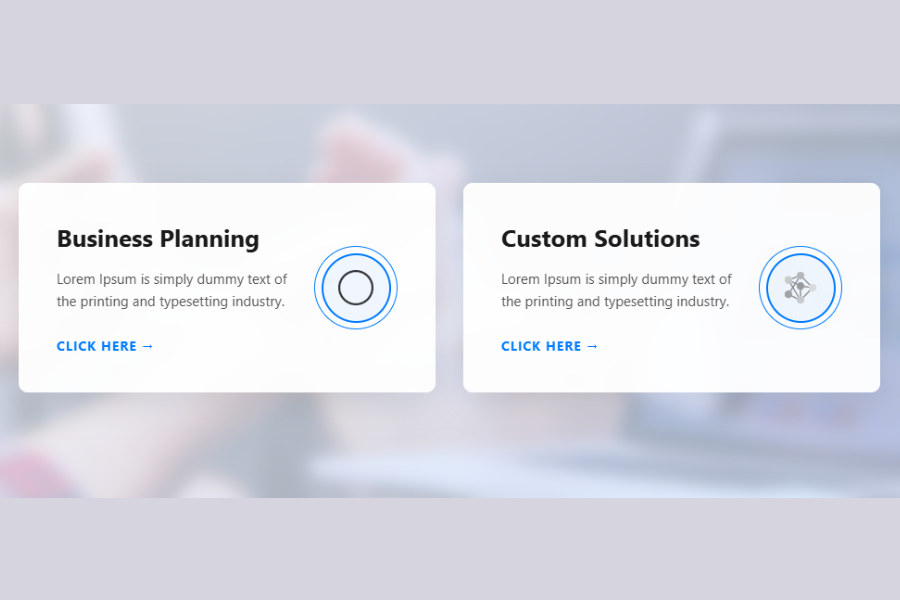
Welcome to TechTimesGlobal.This project is an innovative hover card design in HTML and CSS. It offers a stunning and engaging user interface design using only HTML and CSS, without using JavaScript. It is simple, elegant, and attractive, so it can be used in business sites, portfolio and services sections.
This project includes several cards placed side by side, each with a title, description, button and icon. The best aspect of this project is the hover effect. On hover, the card changes its background colour, moves up and displays a series of animations. It adds an interactive element and enhances user interaction.
The design also features blurred image background, shadows and contemporary typography to bring elegance. This is a good example of the versatility of CSS.
HTML Structure
The HTML code constructs the webpage. It begins with the HTML5 doctype, which makes the webpage compatible with all browsers. The element also has a language attribute to aid accessibility.
Within the tags, there are meta tags to set the character encoding and responsiveness. These make sure that the web page renders correctly in all devices, including mobile devices. Here, the page title is set, which is shown in the browser’s tab.
The defines the body of the webpage. It implements a flexible layout to place the cards in the centre. Within the body, there are two cards.
Both cards have two sections. The first one is the content section, which consists of a heading, a paragraph, and a button. The heading is the title of the card, for instance, “Business Planning” or “Custom Solutions”. The paragraph is the description of the card, and the button is used for action.
The other part is the icon section. This section has circles containing an image. The circles are used to accentuate the icon and make it look more appealing. The icon symbolises the card’s function.
The design is clear and simple, and easy to maintain.
CSS Style
The CSS portion of the project is used to make the design appealing and interactive. It incorporates some of the latest styling techniques like gradients, blur, transitions and animations.
The background is designed using a background image and a gradient. This results in a subtle and distinctive background. And a pseudo-element is used to create a blur effect. This gives a subtle blurred effect to the background, allowing the cards to be easily distinguished.The cards have a partially transparent white background, rounded edges and shadows. This makes them appear like glass. Padding and margins are used to ensure that the cards’ content is properly aligned.The typography is also well thought out. The headings are strong and prominent, and the text is a light color. It’s a good visual hierarchy. The button is bolded and in uppercase, with a subtle background color, which makes it stand out.
The icons are contained within circles with borders and background. They add depth to the icons, giving them a more appealing look. The icons are first shown in grayscale and subtly colored.
Hover Effects and Animations
The hover effect is crucial to this project. On hover, there are a number of transitions.
The background of the card becomes darker and the card is raised a bit. This creates a floating effect. Meanwhile, the text turns white, improving its legibility on the darker background.
The button also shifts a bit to the right, adding a bit of animation. The icon part of the button also changes. The outer circle spins and the inner circle turns blue. The icon also brightens up and grayscale effect is removed.
Finally, a blue border line also appears at the bottom and grows to the width of the card. This completes the hover effect.
These effects are achieved using CSS transitions for a smooth and pleasing effect.
Responsive Design
To create a responsive design, media queries are used. The design is changed from a horizontal to a vertical layout on smaller devices like tablets and mobile devices. This allows the cards to be stacked on top of each other, making it easier to read on smaller screens.
The size of the cards is also reduced. This helps to keep the design simple and functional.
Overview
This hover card is a great example of contemporary web design with just HTML and CSS. It demonstrates how basic elements can be stylised and animated to create an interactive and visually appealing design.
The design showcases basic principles of layout, hover, transitions, and responsiveness. This is particularly helpful to those starting out and learning how to design interactive elements.
The layout can be adapted for different purposes, such as showcasing services, features, or products. It can also be enhanced with JavaScript to add more features.
In general, this project demonstrates the potential of CSS for designing contemporary and attractive websites.
Source Codes[Scroll Down]
From here, you can download the source code files for this Bakery Website Hero Section by clicking the download button provided below.
The source code is completely free and can be reused or modified for your own projects.
Click here –Elite Fitness Bento Gallery Using HTML and CSS with Modern Grid Layout