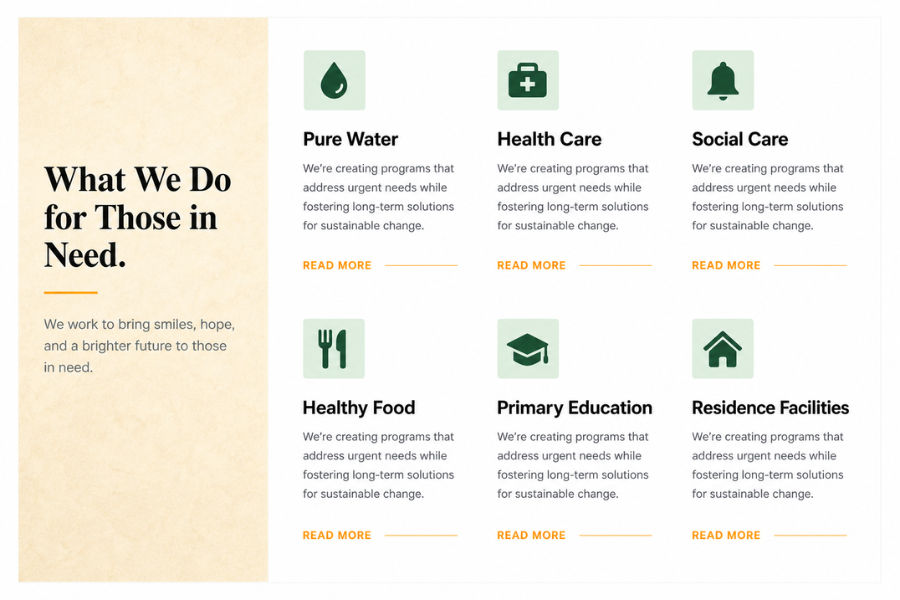
Welcome to TechTimesGlobal. Today in the project, we are going to create a Clean and meaningful NGO Services Section UI Design with HTML, Tailwind CSS, and JavaScript. This design is ideal if you are working on a charity website, a non-profit organization page, a donation site, a social awareness website or a community support project. The layout below is a professional grid design with clean typography, service icons and organized content sections giving an emotional and trustworthy user experience.
In charity and community service related websites, service sections are playing an important role. They have the ability to communicate to visitors at the first glance what the organisation does, how it supports people, and where they are being used. Designs that foster trust, enhance communication and establish a greater bond with the user are good designs.
This design starts with a strong message, What We Do for Those in Need, on the left side. This has an immediate impact on the emotions and it clearly states the mission of the organization. Left of this section, a number of service cards point out support services such as pure water, health care, social care, healthy food, education and residence services. The information is presented in an organized format that is easy to understand and visually appealing.
HTML Structure
This project’s HTML structure is simple, easy to follow and easy to start. First create a main area container for the services area in general. Within that section, create a two- column layout with grid/flexbox. This will aid beginners in understanding content organization, card-based layouts and responsive design principles. Service cards can be added on as the project progresses.
TailwindCSS Style
The Tailwind CSS styling makes this NGO services section look clean, modern, and professional. Tailwind allows you to build responsive UI designs faster using utility classes.
Start by applying a soft cream or light background to the left content section. This creates warmth and emotional appeal. The right side can use a clean white background with evenly spaced cards.
Typography is very important in this design. Use bold serif or strong heading fonts for the mission statement, while service descriptions use softer gray text for readability.
Each service card can include a light icon background with soft green accent colors to represent growth, care, and positivity. Add proper padding, rounded corners, and subtle hover effects to improve the user experience
Overview
Service sections are extremely useful in almost every professional website today and this project will be of great use to you. If you’re developing a charity site, a school website, a healthcare site or a community portal, it’s quite beneficial to learn UI design like this. This project enhances your layout design, content hierarchy, card systems, responsive UI, and modern Tailwind CSS development abilities. This project is for beginners of the front-end development. It makes you familiar with card layouts, typography balance, responsive design, the organization of content, and Tailwind CSS utility styling. These skills are very useful in the creation of websites that are professional for clients or personal use.
Source Codes[Scroll Down]
From here, you can download the source code files for this Services Section Design by clicking the download button provided below.
The source code is completely free and can be reused or modified for your own projects.
Click here -Modern IT Solutions Website Using HTML and Tailwind CSS for Business Growth