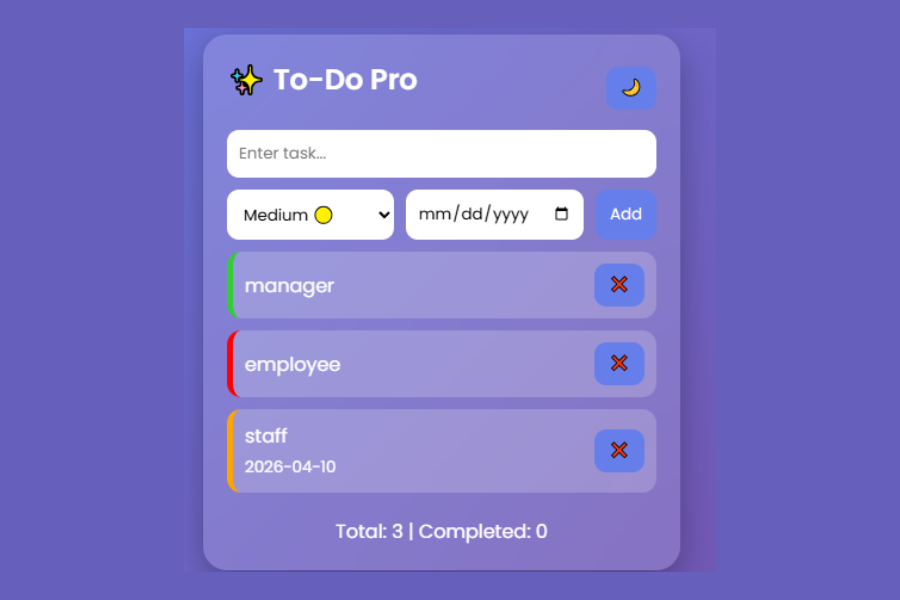
Welcome to TechTimesGlobal.This is a project that is a modern and high quality To-Do application and developed with HTML, CSS and JavaScript. It is created in a manner that allows users to handle their day-to-day activities easily and in a more appealing manner. Simple tasks, such as adding, deleting, marking as complete, setting a level of priority, selecting a date and storing it on a local storage are all included in the app so that the tasks stay the same even when the page is refreshed.
This app is designed following a glassmorphism UI that makes it soft, blurred, and modern. It also has a dark mode option which makes it easier to use in various lighting conditions. On the whole, this project is an excellent demonstration of the integration of functionality, neat and appealing design.
HTML Structure
This code has the HTML, which describes the web page framework. It begins with the simple document structure with the use of the <|human|>It begins with simple document structure.DOCTYPE html and and <html tags. Meta tags such as character encoding and viewport settings are also significant inside the head as they make the page responsive to any devices.
The tag is the name of the page (Premium To-Do App), which is displayed at the top of the browser tab. To make the text appear contemporary and clean, a Google Font (Poppins) is also associated.
The primary content is contained within a <|human|>Within the main content, the contents are contained into a div with the class container. This will serve as the primary card or box containing the overall app.
On the top side, it has a top bar area where the app name is displayed as ✨ To-Do Pro and a button to switch to a dark mode. This will enable uses to alternate between light and dark themes.
Below this is two input areas:
The former enables users to enter their task into the first input.
The second input group has a dropdown of the priority (low, medium, high) selection and a date picker and a button to add tasks, which is called Add.
Then, we have an unordered list ( and all tasks will be dynamically shown with the help of JavaScript. A message No tasks yet is displayed in case there are no tasks.
Last but not least, is the stats section which shows the total number of tasks and completed tasks. This provides the users with a brief overview of their place.
CSS Styling
The visual appearance of the app is the responsibility of CSS component of the code. It begins with a generalized chooseer ( * ) so that the default margins and paddings are eliminated and that all the elements are subjected to Poppins font.
Its body is shaped to bring the body to full size and align the app both horizontally and vertically. A gradient background has been used and this makes it a smooth and modern background. Cyborg mode: When this is turned on, the backdrop turns black.
There is a glassmorphism effect in the.container class. This is done with backdrop-filter: blur(20px), having a semi-transparent background. The app is designed to look like a floating card including rounded corners and shadows.
The headings are placed in the middle and they are spaced appropriately to give a clean presentation. The flexbox style has been used to make the top bar fit the title and button.
Input fields and buttons are designed with padding, rounded corners, and no borders. There is also a hover effect on the buttons, which slightly enlarge and provide a nice bouncing response.
The task list (ul and li) has been styled in such a way that it looks like a scrollable list of tasks. All of the task items are semi transparent with rounded corners. On finishing a task it receives a line-through effect and decreased opaqueness.
Colored borders are used to represent the different priority levels:
High priority: red.
Medium priority: Orange.
Green to indicate low priority.
The buttons such as delete within a given task are aligned in the .actions class. The delete button has red color to point out danger.
The empty message and the stats areas are placed in the middle with some faded effects to have the minimal design.
There is also an animation (fadeIn) which makes the tasks to be added in to appear smoothly.
JavaScript Functionality
The app is made interactive using JavaScript. It manages all the dynamic operations like adding, removing and updating tasks.
When opening it, crucial features such as task list, input fields, and stats are picked with document.getElementById().
The tasks are archived in an array as well as in localStorage. This makes sure that the page is not lost since tasks can be saved.
The addTask() function is used to add a new task. It accepts input text, priority and date and is added to the task array. It also clears the input fields post addition.
The renderTasks() method is one that is highly critical. It reveals all the tasks on the screen. It cycles through the list of activities and dynamically generates list entries. It also marks the number of tasks that have been done and revises the statistics.
The deleteTask() method will remove a task with its index in the array.
When a user clicks on the toggleTask() functionality, the task will be registered as accomplished or not.
The toggleDark() method makes the body light or dark, adding or removing a class.
The handleEnter() method enables one to use the Enter key to save time on clicking the button by pressing the Enter key.
Lastly, renderTasks() is invoked on page-load to show any saved tasks.
Overview
In general, this To-Do app is a full-fledged mini project which integrates both the design and functionality. It allows novices to grasp the significance of such concepts as manipulation of the DOM, event handling, local storage, and responsive user interface. Its clean structure and the modern styling make it appear to be a real-life application. It can be improved even more by adding such functionalities as: edit task, search, filters, or notifications to this project making it even powerful.
Source Codes[Scroll Down]
From here, you can download the source code files for this Bakery Website Hero Section by clicking the download button provided below.
The source code is completely free and can be reused or modified for your own projects.
Click here –Minimal E-Shop Product Gallery – Clean UI Design Overview(Html , Css and Java Script)