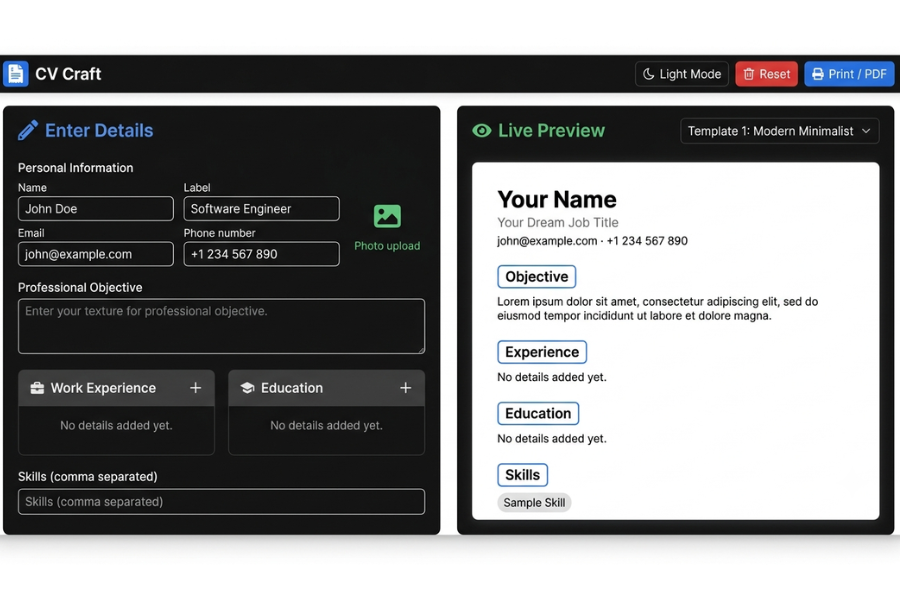
Welcome to TechTimesGlobal.Modern Resume Builder Web Application is a simple and easy to use project in HTML, CSS and JavaScript. It assists the users to develop their professional resumes with ease, without the requirement of any extra software. One of the most crucial documents when it comes to job applications, internships and higher education is a resume. Many individuals struggle with creating a professional resume due to their lack of knowledge about the editing tools. This application is designed to solve this problem; the user can easily fill in his/her personal information, educational information, work experience, skills, and career objectives.
As users type information, the resume is immediately updated and users can see how the resume will look when they are done. In addition, there are several templates to choose from for resumes, uploading profile pictures and dark mode options, and download options for print and PDF. It automatically saves user information in Local Storage, so beyond browser refreshes it will not be lost. In summary, this project showcases the ability of using modern web technologies to build practical and professional applications for making resumes.
HTML Structure
The Modern Resume Builder Web Application is based on HTML. The HTML5 document structure is presented at the top of the webpage, after which the head section includes meta tags, Bootstrap, Font Awesome, Google Fonts and CSS links. The body is broken up into two areas using the Bootstrap grid system.
The left pane is the resume editor, which is filled with personal information, objectives, education, work experience, skills and uploads a profile picture. The right side will show the live preview of the resume. The application features a navigation bar that has dark mode, reset and print buttons. A template selector provides an option to choose one of the various templates for the resume. The HTML structure is clean, well structured, responsive, easy to understand and has a strong foundation for the application.
CSS Style
The Modern Resume Builder is designed with a clean and professional look by using CSS. Responsive layouts, modern cards, smooth shadows, rounded corners, and pretty typography are achieved by using Bootstrap and custom CSS. Colors are stored in CSS variables for both light and dark mode.
The different resume templates offer various templates and font options to make it easy for the user to select a desired template. Hover effects and smooth transitions are included in buttons for enhanced user interaction. The resume preview is designed to fit an A4 size paper so that you can print it out or export it in PDF. Media Queries make the app responsive to various screen sizes. As a whole, CSS makes the application looks much better, it is responsive and user friendly.
JavaScript Functionality
All of the interactive elements of the Modern Resume Builder are done in JavaScript. As users type and edit in the form, it refreshes the live preview of the resume. The education and work experience sections can be added and removed dynamically without refreshing the page.
The app also enables users to upload their profile picture and it will appear immediately in the resume preview. The template switching, dark mode, restoring of the saved data on application reloading and saving of the data automatically using Local Storage is managed by the JavaScript. Print function allows users to download or print their resumes in .pdf format. The application simplifies the use and makes it interactive and efficient with JavaScript that automates all big functions and offers a smooth user experience.
Overview
Modern Resume Builder Web Application provides a browser-based application to build professional resumes with ease. A form to enter personal information, education, work experience, skills and career objectives is included in the project. Information entered is shown in real time in the live preview section.
Multiple resume templates are supported in the application, users can switch to different template designs as per their preference. It also has a profile image upload, dark mode, auto-save data, and print/PDF export option. Multiple education and work experience sections can be added at run-time as needed. The application is completely responsive, and it works well on desktops, tablets and mobile devices. Overall, it is a straightforward, speedy and effective tool to make top quality resumes with HTML, CSS and JavaScript.
Source Codes[Scroll Down]
From here, you can download the source code files for this Personal Diary Website Design by clicking the download button provided below.
The source code is completely free and can be reused or modified for your own projects.
Click here -Interactive Drawing App Using HTML, CSS and JavaScript