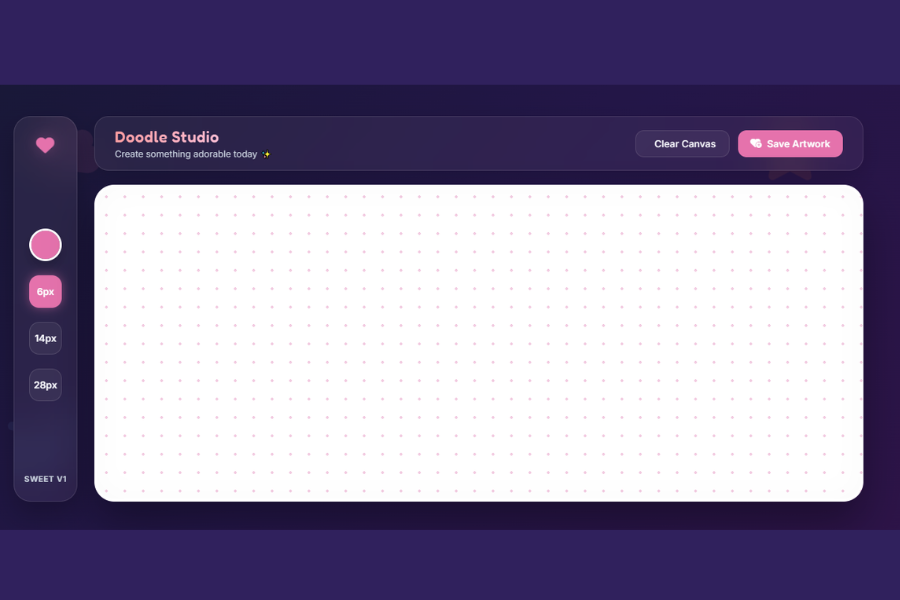
Welcome to TechTimesGlobal.Drawing App is a simple and interactive web application built with HTML, CSS and JavaScript. It enables people to produce digital drawings without installing any software in their web browser. The app offers a blank canvas on which the user may draw with various sized brushes and colors. It features a contemporary and appealing design, making drawing fun for all levels of experience. There are also helpful features in the app like clearing the canvas and saving artwork as an image. In general, this project provides a good example of how to use front-end web technologies to create a responsive and interactive drawing application.
HTML Structure
HTML sets the skeletal structure of the Drawing App and arranges all of the user interface parts. The webpage starts with the standard HTML5 document structure, in which the head section is reserved for adding fonts into the page, icons, metatags and styles. The main workspace of the application is the body.
A sidebar is formed to show drawing tools like the color choice and brush size buttons. The main section has a navigation bar with buttons to clear the canvas and save the artwork, as well as the application title. Below the navigation bar is an HTML5
CSS Style
CSS is used to design the Drawing App with a modern, colorful, and professional appearance. A stunning gradient background is implemented along with the glassmorphism effect for application UI, which gives it a premium look. The design is visually appealing, featuring soft pastel hues, rounded corners, transparent panels, and smooth shadows.
Buttons have interactive hover effects, color picker and brush size buttons are easily identified when clicked. The background of the drawing canvas is white, clean and dotted, providing a creative space for users. Responsive layouts and media queries make the application function well on desktop, tablet and mobile devices. In conclusion, CSS helps to make the Drawing App more attractive and easy to use.
JavaScript Functionality
All interactive features of the Drawing App are controlled by JavaScript. It allows the user to make free hand-drawings on the canvas with the mouse or the touch gestures, using the HTML5 Canvas API. Once the user clicks on the mouse button or touches the screen, the application begins to draw, and when the user releases the mouse button or lifts their finger off the screen, the application stops drawing.
The colour of the brush can be changed by clicking on the colour picker, and the drawing colour will update instantly in JavaScript. The brush size buttons enable the user to change the size of the stroke he/she is using during drawing. The Clear Canvas button will clear all drawings from the canvas, providing a fresh canvas to the user. The Save Artwork button will save the canvas as a PNG image and save that image to the user’s device. JavaScript also resizes the canvas when the browser window is resized in order to provide a smooth and responsive drawing experience across various screen resolutions.
Overview
Drawing App is a web based digital painting program that allows users to use basic drawing tools to produce paintings. Before drawing on the canvas, users can choose the color and brush size of the brush they use. It works on desktop, tablet and smartphones with mouse or touch. It also offers the ability to erase and export the final drawing as a PNG image. The project was created with HTML, CSS, and JavaScript, providing a seamless, responsive, and intuitive drawing experience, and showcasing the real-world application of the HTML5 Canvas API.
Source Codes[Scroll Down]
From here, you can download the source code files for this Personal Diary Website Design by clicking the download button provided below.
The source code is completely free and can be reused or modified for your own projects.
Click here -Typing Speed Test Web Application Using HTML, CSS and JavaScript