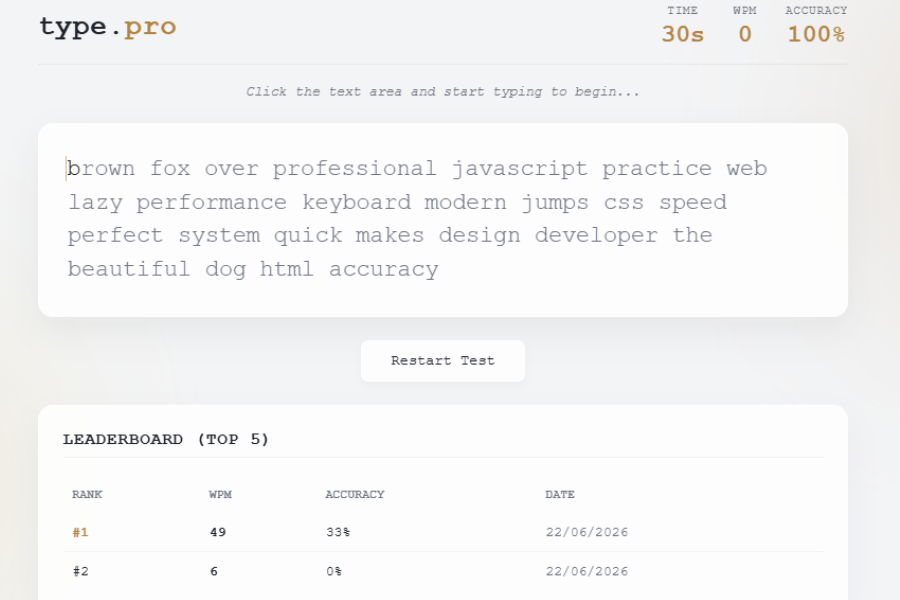
Welcome to TechTimesGlobal.The typing speed test Web App is a simple and interactive project programmed in HTML, CSS and JavaScript. It offers a real-time typing practice environment that enhances users’ typing speed and accuracy. The application presents users with random words to type within a set time frame, and records and calculates their typing accuracy and Words Per Minute (WPM). It also points out typing errors and displays results immediately. Local Storage is used to store the top scores, so that users can monitor their progress via a leader board. The application is user-friendly and modern with an easy-to-use interface and provides a fun practice method to help you develop and enhance your typing skills.
HTML Structure
This Typing Speed Test application has the complete structure of the application is defined by HTML. The file starts with a standard HTML5 declaration followed by the head section of the HTML containing the important meta tags, the page title and internal CSS styles. The body area is responsible for hosting the primary interface of the application and structure all graphical components in an orderly and logical fashion.
The application is based on the central container, which houses all the major parts of the typing test application. A header at the top of the page will show the application name and key performance data like typing speed in Words Per Minute (WPM), typing accuracy percentage, and the countdown timer. The statistics change on-the-fly while the user is typing.
A notice section is placed beneath the header that gives simple instructions for users prior to taking the typing test. An invisible text input box is also there, to collect the keypresses without clutter.
The main typing area shows a random text that the users have to type. The span element is used to enclose each character individually, and to provide different styling for the correct, incorrect and typed characters while the user is typing.
The Restart Test button is located in a control section to allow users to restart a typing episode whenever they want. The application also features an HTML table-based leaderboard section with the top 5 typing scores with WPM, accuracy and test date.
In general, the structure of HTML is semantic, organized, and well suited for interaction and is very readable and accessible.
CSS Style
The application is visually appealing and easy to use due to the role played by CSS. The project is designed according to premium light-themed design principles and modern user interface principles which gives a professional look and feel.
The application has a consistent color palette throughout the application using CSS custom properties. The use of soft background colors and elegant accent colors of bronze gives a clean and elegant look. The typing area and leaderboard are rendered with transparent backgrounds, blur effects, and subtle borders, resulting in a contemporary feel on the application.
Careful use of a monospace font for better typing readability. The use of large fonts and correct spacing helps to avoid eye strain and allows for comfortable line heights, enhancing the overall typing experience.
The typing area will dynamically change the appearance of all characters while typing. Typing text in the correct colour, typing text in the wrong colour will have a soft red background, typing in the active position will have a caret animation blipping. With these visual cues users can recognize errors instantly.
Animated buttons with hover effects, smooth transitions and shadow effects enhance user interaction. The leaderboard is created with responsive tables, distinct typography and highlighted leaderboard for best players. In general, the CSS styling makes it a simple typing application into an attractive, highly functional web interface that looks like a top quality application.
JavaScript Functionality
All interactive features of the Typing Speed Test application are powered by JavaScript. It controls the typing session, generates random text, calculates performance statistics, controls timers, stores leaderboard data and updates UI in real-time.
When the application is launched, JavaScript will randomly pick words from a list of pre-defined words and generate a paragraph to type. Each character is separated into a separate span element allowing the application to independently track each letter typed.
The countdown timer begins as soon as the user starts typing. Each key press is matched with the corresponding character in the text shown. Right characters are green, wrong characters are highlighted as typing errors. The application always updates the typing position, and users can always know where they should continue to type.
Due to the total number of characters typed and the time taken, the typing speed is calculated using the standard Words Per Minute (WPM) formula. Meanwhile, JavaScript determines typing accuracy by dividing the number of correct letters by the number of letters that have been typed. As the user types the values are updated in real time.
Once the user has typed the whole paragraph, or once the timer has expired, the typing session will end automatically. To the user, the final WPM score and typing accuracy is presented in a completion message.
One of the other key features is the leaderboard system. Local Storage is used to store the user’s top typing scores in JavaScript within the browser. Typing speed is determined automatically as the scores are saved and only the top five scores will be shown within the leaderboard table. This also enables users to track their progress through multiple sessions of practice.
The restart restarts the timer, removes all the text entered before, creates new random text and begins a new typing session right away. JavaScript also makes sure that interactions are smooth across the application, without having to refresh the webpage, to update all interface elements.
Overall, JavaScript makes the project more than just a webpage and makes it interactive enough to measure typing speed, accuracy, and typing performance in real time.
Overview
The Typing Speed Test Web Application is a Web application-based project that allows its users to practice and improve their typing skills. It gives the user a text that appears randomly and the user can type within a specified time, while keeping track of typing speed (WPM) and accuracy in real-time. The application indicates the correct and incorrect characters which helps to find out the mistakes easily. It also has a restart function and a leader board with the 5 best scores stored with Local Storage. Developed using HTML, CSS, and JavaScript, the application features a modern, responsive design that works smoothly on desktops, tablets, and mobile devices, providing an engaging and effective typing practice experience.
Source Codes[Scroll Down]
From here, you can download the source code files for this Personal Diary Website Design by clicking the download button provided below.
The source code is completely free and can be reused or modified for your own projects.
Click here -Modern Premium Quiz App Using HTML, CSS and JavaScript