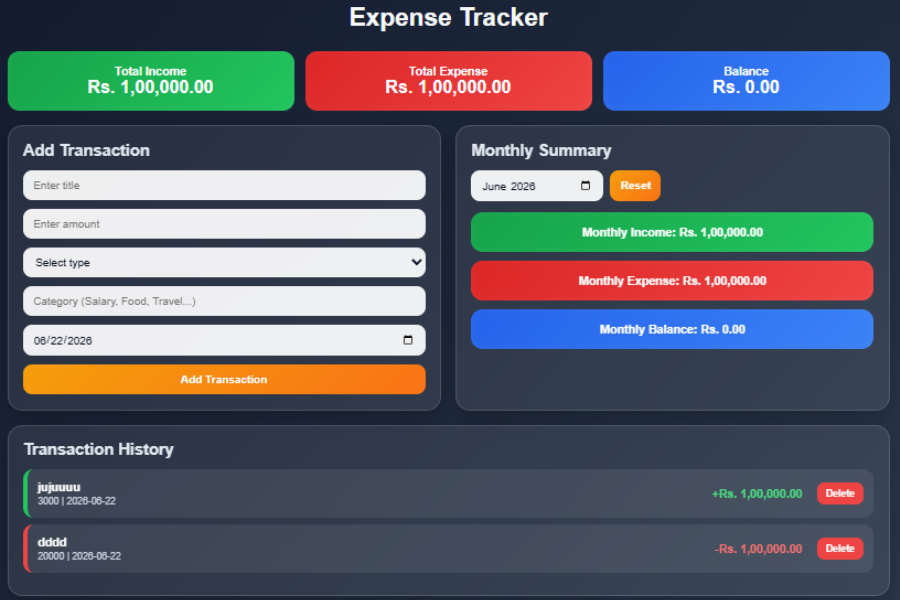
Welcome to TechTimesGlobal.Expense Tracker Pro is an up-to-date online finance management software that allows users to track, manage, and analyze their income and expenditure. Personal finance management can be hard by hand, as people typically don’t remember what they have spent and they do not take care of proper records. This project addresses this issue by enabling users to keep their transaction data in the digital format and can easily check the financial situation anytime.
Users can add income/expenditure, classify their spending, and track their financial performance through the application. It automatically calculates total income, total expenses and remaining balance without the need of manual calculation. The project also incorporates visualizations of financial information, making it easier for users to comprehend their financial patterns.
Expense Tracker Pro is lightweight, responsive and easy to use as it is created with HTML, CSS and JavaScript. Application stores data in the Local Storage of the browser, so the user can still see all transactions, even if the page is refreshed. This project is a practical application of current web technologies to solve real-world financial management issues.
HTML Structure
The Expense Tracker Pro application is built on the basis of HTML. It’s in charge of the general layout and arranging all the elements of the user interface.
The application starts with a main container which contains all sections of the project. The name of the project is written at the top, making this application easy to identify. A set of summary cards are generated below the title to show Total Income, Total Expense, and Current Balance. These cards offer rapid financial details to people.
A transaction form is provided, in which the users can provide the necessary information about the transaction that is to be entered into the database, including the title, the amount, the type of the transaction, the category of the transaction and the date of the transaction. The form has input fields, dropdowns, and buttons to add new transactions.
There is also a Monthly Summary section in the HTML structure in which users can use a month selector to filter records. The Transaction History area also has a noteworthy feature—the list of all transactions recorded in an organized manner.
Last but not least, canvas elements used by Chart.js to show graphical reports are included in the application. These charts allow users to more effectively visualise financial information. The HTML structure is correct and makes all the parts available in an appropriate manner on various devices.
CSS Style
The Expense Tracker Pro application is enhanced in terms of design and user experience, utilizing CSS. The styling is modern, professional, responsive, and the app is aesthetically appealing and user friendly.
The application is designed with a gradient background, which is a dark blue color, adding premium and modern look to the application. Using transparency, borders and backdrop blur properties allows glassmorphism effects to be applied to cards, designing a stylish interface.
Use different colours to make it clear what is what: Summary boxes. Green: Income; Red: Expense; Blue: Balance. This color-coding enables users to quickly get a sense of their financial situation.
The sections are organized with CSS Grid to create responsive layouts. The application automatically adapts to fit the screen size and is compatible with both desktop, tablet and mobile devices. Button Hover Effects: These effects are used to give visual feedback to users when they interact with buttons.
Other styles are used with transaction cards, forms, charts and typography to make it easier to read and to engage the user. To ensure that the design is responsive and adapts to any device, media queries are employed.
In total, CSS makes the basic HTML structure pleasant to look at and professional into a financial management application.
JavaScript Functionality
The dynamic behaviour and functionality of the Expense Tracker Pro application is controlled by the core technology of JavaScript. It is used to interact with the user, process data, perform calculations, and create charts.
JavaScript stores the information entered by users and creates an object for the transaction containing details like the title, amount, type, category, date, etc. when the user submits the transaction form. This transaction then gets stored in an array and is saved to Local Storage.
As transactions are added and deleted, the total income and total expenses are added and subtracted automatically, and the total available balance is calculated. These calculations are instantly visible on the dashboard, giving real-time financial updates.
There is a transaction history module in the application, which creates transaction cards dynamically using JavaScript and prints them on the screen. The system calculates everything automatically, and users can delete transactions with the delete button.
Also, filtering functionality is added monthly using JavaScript. Users can click on a month to view all transactions for that month, and also get the total income and expenses, and the balance for the month.
Another significant feature is the chart generation. JavaScript is also used to connect with Chart.js and produce an Income vs Expense Bar Chart and Expense Category Pie Chart. These charts automatically update whenever there are changes in transaction data, which helps to maintain accurate visual representation of financial information.
The application also saves transaction data permanently in the browser using the Local Storage. This means that all financial records are still available after refreshing/reopening the application.
In sum, JavaScript makes this project a complete dynamic and intelligent financial management system.
Overview
Expense Tracker Pro is a personal finance management system which lets users keep a complete record of their income and expenses. It offers an interactive dashboard to add transactions, check transaction history, analyze monthly financial performance and visualize spending data with charts.
The application has several modules such as transaction management, financial summary generating, monthly analysis, visualization of the chart. The user can add information like Title, Amount, Nature of the transaction, Category, Date. This information is used by the system and financial calculations are updated automatically.
There is also a monthly filtering option which enables a user to check financial transactions from one particular month. The income and expenses can be compared with a bar chart and the distribution of expenses with a pie chart, with the help of Chart.js. In sum, the project is an all-in-one, easy-to-use tool for personal finance monitoring and management.
Source Codes[Scroll Down]
From here, you can download the source code files for this Personal Diary Website Design by clicking the download button provided below.
The source code is completely free and can be reused or modified for your own projects.
Click here -Bestseller Products Section Design Using HTML, Tailwind CSS & JavaScriptt