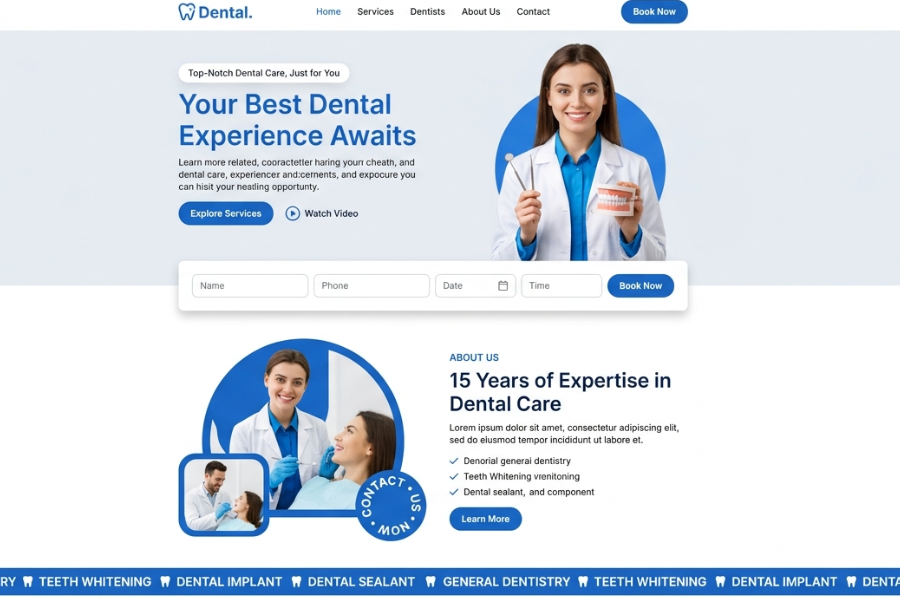
Welcome to Techtimesglobal. We developed a CSS based modern dental clinic web site UI with HTML and JavaScript in this project. The design suits well in clinics, hospitals, and individuals in the healthcare field, desiring a clean, reliable and professional online presence.
A healthcare site must be easy, soothing and trustworthy. That is why, this design is based on the soft blue color, clean typography and structured design to establish trust with visitors.
Clean Hero Section & First Impression
The hero section is the very first thing that users see and its role is very important. It has a powerful heading such as Your Best Dental Experience Awaits and a brief description of services.
Two distinct call-to-action buttons are present:
Explore Services
Watch Video
This assists users in knowing what to do. The image of a professional dentist on the right side gives the human touch and creates an instant trust.
The booking of the appointment form that is located directly in the hero section is one of the best features here. The booking can be done within minutes as the user only needs to input his or her name, phone, date, and time.
About Section & Trust Building
The About section puts emphasis on experience and expertise, including 15 Years of Expertise in Dental Care. This plays a major role in healthcare websites as the user is always in search of trust and credibility.
Key services like:
General Dentistry
Teeth Whitening
Dental Sealants
are well enumerated so that users can easily know what the clinic has to offer.
The use of small icons and clean layouts enhances the readability and makes the section appealing to the eyes.
UI Structure & User Experience
This design puts much emphasis on user experience (UX). All the sections are spaced and scannable. This design is so user experience-oriented (UX). Every section is well spaced and easy to scan. The project is constructed based on:
HTML – to organize the content.
CSS – to style quickly and responsively and in a modern way.
JavaScript- to provide interactivity such as form handling and user interface actions.
CSS is faster to develop with the utility classes and JavaScript enhances the user experience with dynamic behavior. This project is a good demonstration of how to develop a real-world healthcare web application interface, particularly when you are a beginner or intermediate developer. This project is a great example of how to create a real-world healthcare website UI, especially in case you are a beginner or middle-level developer.
Source Codes[Scroll Down]
The entire code of this Healthcare Dental Website UI may be downloaded and then used to study or for personal projects. It is easy to customize and responsive with a simple design.
In case you like this project, refer to other developers and continue to visit Techtimesglobal to get more UI designs, templates, and frontend tutorials.
FreshHarvest – A Modern Organic Grocery E-Commerce Website Built with HTML, CSS & JavaScript