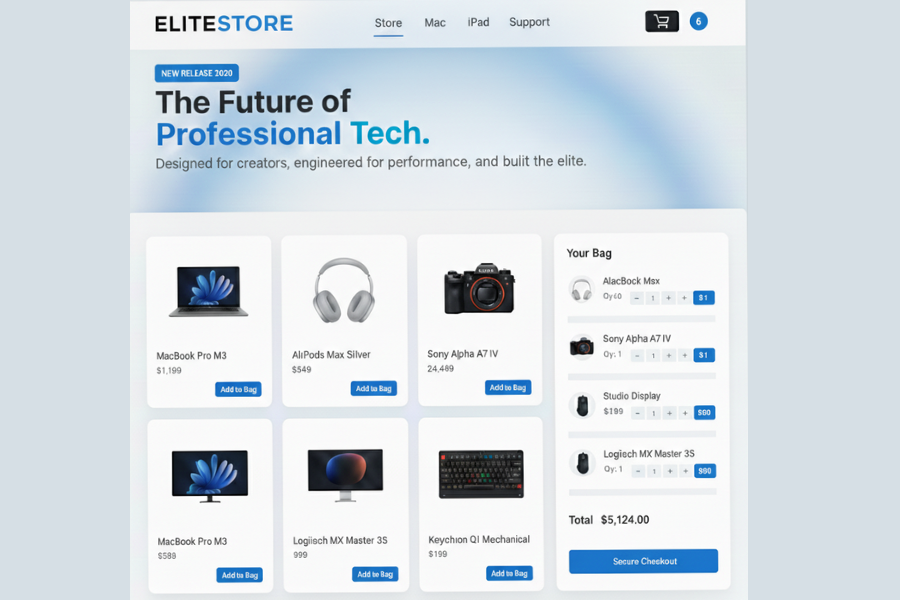
ELITE STORE is a professional online store web interface that was developed based on the best frontend web development technologies such as HTML, CSS, and JavaScript. The project will have a sleek, upscale, and amateur-friendly appearance as in the case of the brick-and-mortar high-end online shops. The primary objective of the project is to demonstrate the collaboration of the elements of structure, design, and functionality to create an entire shopping experience without references to external frameworks.
HTML Structure- Construction of the Website Design
The fundamental structure of the ELITE STORE is done using the HTML code. It serves as the base of the project and dictates the manner in which every section is positioned on the page.
A navigation bar is also provided at the top of the site and has links to the menu and store logo below the logo and a shopping cart icon. This enables the users to move through the site easily.
Beneath the navigation bar there is a hero section that presents the brand using a strong heading, a brief description and a little announcement badge. The presence of this section helps to make the first impression on visitors clean and professional.
This central content zone is further broken down into two. On one side there is a grid with the products displayed in the form of separate product cards and the other side has a cart sidebar where the selected products and the total price are shown.
The product cards additionally have images, name of the product, price and add to bag button to enable quick interaction. As the user adds an item, the cart will automatically update and thus the shopping experience becomes interactive.
The HTML structure generally makes it easy to maintain the layout as well as make it easy to work on and expand on in case of any future improvements.
CSS Styling: Building a Premium UI in Modern times
The site has been made modern, clean and professional with the help of CSS. The design is based on the high-end Apple-like minimal interface.
The custom color variables are hardcoded with :root and it is easy to control theme colors such as accent blue, the background color and text colors throughout the site.
The navigation bar has a blur and transparency glassmorphism effect, which gives it a high-end appearance. The cards of the products contain smooth hover effects and subtle shadows to add depth and interactivity.
CSS grid has been applied in layout to ensure that products are well arranged and spacing is maintained. The matted edges, small borders and flow make it easier to use.
Responsive media queries assure the site that it will be used well with the smaller screens, and the layout is stacked, with the extra links in navigation being concealed to mobile devices.
Altogether, CSS is used to make a simple structure look professional and refined in terms of a shopping interface.
JavaScript Functionality – Interactive and Cart Dynamic
The site is interactive and made possible through JavaScript that provides the site with the feel of a real e-commerce application. It deals with the operations of the user like loading the cart with products, updating quantities and it automatically calculates the total cost.
Product array holds all the necessary information about the product, such as the name, price and the picture. The products are not written on the HTML but displayed dynamically on the page using JavaScript which makes it easier to maintain and update the site.
The project will consist of a number of key functions:
render()
This functionality shows all the products within the product grid when the page is loaded and sets the cart system to be used.
add(id)
By clicking the button, Add to Bag, the product is added to the shopping cart. When the product is already added to the cart, it will just add the quantity but not a duplicate product.
qty(id, change)
This feature enables the user to add or remove the number of units of a certain product via the cart.
update()
This operation reinvigorates the cart existence and reinvigorates the items attributes, re-evaluates the overall cost, changes the badge on the cart counter and documents the cart information.
LocalStorage is used to save the cart data, so the items chosen will not be lost when the user clicks on the refresh button. This enhances the general user experience and brings the project nearer to the real online store.
General Project Overview – Live Shopping Experience
The project of ELITE STORE shows the collaboration of HTML, CSS, and JavaScript to develop a single-page e-commerce interface in a professional design. The project consists of responsive design, dynamic product rendering, cart management, and persistent storage which makes it a powerful frontend project of portfolio level.
It also demonstrates such practical ideas as the UI creation, data manipulation, and real-time updating, which are important in the modern web development process.
Source Codes[Scroll Down]
From here, you can download the source code files for this Bakery Website Hero Section by clicking the download button provided below.
The source code is completely free and can be reused or modified for your own projects.
Click here – Luxury Smart Digital Clock Using HTML, CSS & JavaScript